
By a creator who’s actually been through the cheap-tripod, wind-ruined-audio phase
So you want to start vlogging. You’ve been watching travel creators throw their tiny cameras off cliffs, mount them on helmets, and somehow still come back with buttery-smooth 4K footage. And somewhere in the back of your head, a thought crept in: “Can I do this without spending a fortune?”
Short answer: yes. Longer answer: it depends on which GoPro you buy, what you’re filming, and whether you’re okay with a little trial and error early on.
I’ve spent time testing, watching real user discussions, reading through forum complaints, and digging into what people who actually use these cameras for vlogging say about them — not just what the spec sheets promise. Here’s everything you need to know about making GoPro vlogging work on a budget.
Who Is This For?
This guide is for anyone who wants to start vlogging without dropping $400+ on a flagship camera right away. Maybe you’re into travel, outdoor adventures, cycling, hiking, or just want to document your life in a more interesting way. GoPros aren’t perfect for every vlogger, but for people who are moving around a lot or filming outdoors, they’re honestly one of the best bang-for-buck options out there.
If you mostly want to sit at a desk and record talking-head style content? A GoPro is probably not your best bet. But if you want to take your camera places and get shots that a phone just can’t pull off, read on.
The Budget GoPro Lineup: What You’re Actually Working With
Right now, the GoPro lineup for budget-conscious vloggers basically comes down to three options:
GoPro Hero (entry-level, around $200): This is GoPro’s stripped-down model. It shoots 4K at 30fps, has a basic touchscreen, weighs almost nothing, and is genuinely simple to use. It’s waterproof without needing extra housing, which is a plus. The downside? No external microphone input, limited stabilization compared to higher models, and you’re stuck with the built-in mic for everything. It’s a solid starter if you’re not too fussy, but you’ll outgrow it.
GoPro Hero 12 Black (around $300, often on sale): This is where the sweet spot is for most budget-focused vloggers. It shoots 4K at 120fps, has HyperSmooth 6.0 stabilization, and it actually supports Bluetooth wireless audio — meaning you can connect something like AirPods or a Bluetooth mic to monitor and capture audio. It also supports the Media Mod for external microphone connections. If you can find it on sale (and you often can, since the Hero 13 is out), this is probably the best value in the GoPro range right now.
GoPro Hero 13 Black (around $400): The flagship model. It has the best battery life, HyperSmooth 7.0, a modular accessory connector, and the most flexibility. This isn’t really “budget” territory, but if you’re serious about vlogging from day one and have a little room to stretch, it pays off over time because you won’t need to upgrade as quickly.
What It Actually Feels Like to Use a GoPro for Vlogging
Here’s where it gets interesting. On paper, GoPros look like perfect vlogging tools. Tiny, tough, waterproof, wide lens. And in a lot of ways, they are. But there are a few things nobody really tells you until you’re standing in a windy park trying to film yourself.
The stabilization is genuinely impressive. After using one on hikes, bike rides, and busy city streets, the HyperSmooth on the Hero 12 and 13 is not a gimmick. Walking shots come out remarkably smooth. You don’t need a gimbal for most everyday vlogging situations, which is a real cost saver.
The built-in microphone is fine… until it isn’t. Indoors in a quiet room? Actually decent. Outside with any kind of breeze? You’ll get that horrible rushing wind sound that makes your audio basically unusable. One thing I noticed right away is that wind is this camera’s kryptonite. The entry-level Hero model has no way to attach an external mic, which is a real limitation.
Battery life will catch you off guard. You’re looking at roughly 60-90 minutes of shooting at 4K before you need to charge. For quick clips and social content, that’s usually fine. But if you’re spending a full day out, bring at least two batteries. This isn’t unique to GoPro, but it stings when you’re mid-adventure and the camera dies.
The wide-angle look is very specific. GoPros shoot with a very wide field of view, which creates that slightly distorted, “action camera” look. It works brilliantly for adventure and travel vlogging. It looks a bit strange for close-up talking-to-camera content where you’re very close to the lens — your nose ends up looking bigger than your ears. The fix is to use the Linear lens mode, which removes the fisheye effect and looks more natural for face-cam style content.
Low light is genuinely bad. To be honest, this is where GoPros show their age compared to mirrorless cameras. Indoor low-light shots get noisy and grainy. If a big chunk of your vlogging happens indoors or at night, a GoPro will frustrate you. There’s no way around this one.
Also Read GoPro Trekking Accessories Every Hiker Actually Needs (And a Few You Don’t)
The Real Pros of GoPro Vlogging on a Budget
It’s tough as nails. People have dropped these cameras off cliffs (literally) and they still work. For outdoor, adventure-style vlogging, you just don’t have to baby it the way you would a mirrorless camera.
Waterproof without extra gear. Standard GoPros handle up to 10 meters of water without any case. Great for beach trips, kayaking, or just not panicking when it rains.
HyperSmooth stabilization saves you money. You genuinely don’t need a gimbal for most vlogging scenarios. That’s $100-$200 you don’t have to spend.
Mounting versatility is unmatched. Chest mounts, helmet mounts, handlebar mounts, suction cups for cars, bite mounts for water sports — the GoPro accessory ecosystem is massive. A lot of the basic mounts are surprisingly cheap on third-party sites.
The GoPro Quik app is actually decent. For quick edits you don’t want to open a computer for, Quik handles basic color correction, trimming, and music. For a free app, it punches above its weight.
Size and portability. Weighing around 86 grams, it disappears into a jacket pocket. You’ll bring it places you’d never bring a larger camera, which means you capture more of your life.
The Honest Cons
Audio without a microphone is a gamble. For outdoor vlogging where wind is involved, the built-in mic is unreliable. If you buy an entry-level Hero model, you can’t even attach an external mic — you’d have to record audio separately on your phone and sync in editing. That’s doable but annoying.
Low-light footage is weak. It’s not a dealbreaker if you mostly shoot outdoors during the day. But if you vlog in restaurants, at events, or anywhere with dim lighting, the footage gets grainy fast.
The GoPro subscription feels like a trap. GoPro pushes its subscription quite hard for cloud storage and unlimited replacements. You don’t need it to use the camera, but some features are locked behind it. Annoying.
The battery situation. Non-replaceable sealed batteries would be worse, but GoPro’s batteries are proprietary. The Hero 13 uses a newer battery that isn’t compatible with older models, so if you’re upgrading, you can’t reuse old spares.
The entry-level Hero model hits a ceiling fast. It’s stripped down to a point where experienced vloggers find it limiting. The lack of manual controls, no external mic support, and reduced stabilization mean most people end up wanting to upgrade within six months.
Making It Work on a Budget: Smart Accessory Choices
This is where you can either waste a lot of money or stretch your budget really intelligently.
Things worth buying:
A decent selfie stick like the GoPro Shorty ($40-ish) makes a huge difference. It gives you the right distance from your face so you don’t look like a fish in a bowl, and it doubles as a small tripod. Genuinely one of the best starter accessories.
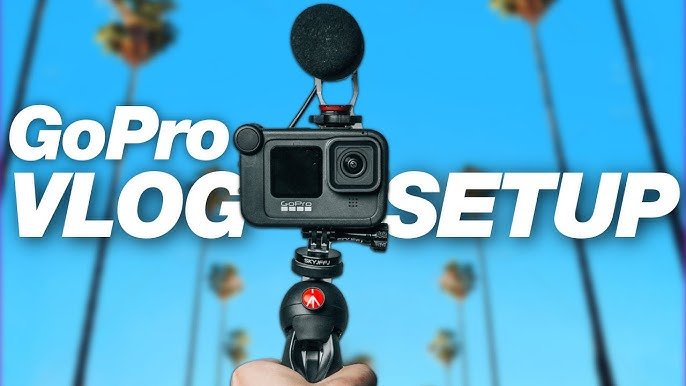
If you go with a Hero 12 or 13, the Media Mod (around $80) is worth it if audio matters to you. It adds a 3.5mm mic input, which means you can plug in an inexpensive wired microphone. It also adds a cold shoe mount so you can attach a small light or a more advanced mic.
Extra batteries. Always get at least two, ideally three. Third-party options from brands like Wasabi or Powerextra are much cheaper than official GoPro batteries and they work fine for most shooting.
A fast microSD card is non-negotiable. Go with a SanDisk Extreme 128GB. Slow cards cause recording issues and dropped frames with 4K footage.
Things you can skip:
The Display Mod (an extra external screen that clips on) is genuinely not necessary. The small front-facing display on the Hero 12 and 13 is enough to frame yourself. Don’t waste money on this early on.
The Light Mod is nice but not essential unless you plan to vlog heavily indoors.
Best Camera Settings for Budget Vlogging
Getting the settings right costs nothing and makes a bigger difference than most people expect.
For outdoor vlogging: 4K at 60fps with HyperSmooth on. This gives you smooth footage that you can also slow down slightly in editing for a more cinematic feel. Set max ISO to 1600 to avoid grainy shots in shade.
One thing many new GoPro users don’t realize: the default “Vivid” color mode oversaturates everything. Colors look punchy at first but unnatural on a bigger screen. Switch to Natural color profile and, if you’re comfortable with basic color grading, use the flat GP-Log mode for the most flexibility in post.
For talking-to-camera content: switch to the Linear lens mode. It removes the fish-eye distortion and makes your face look like a normal human face rather than a GoPro commercial.
Enable Wind Noise Reduction in the audio settings whenever you’re outside. It doesn’t completely solve the problem but it helps noticeably.
GoPro vs. Smartphone for Budget Vlogging
Worth addressing, because people ask this a lot. Modern smartphones shoot incredible video, and if you already have a recent iPhone or Android, you might wonder why you’d bother with a GoPro.
The honest answer: for standard, conversational vlogging — talking to the camera, sitting in cafes, filming your daily routine — your phone is probably fine and maybe even better in low light.
Where a GoPro wins is when you’re moving. Walk-and-talk vlogs, cycling, hiking, anything involving speed or rough conditions — the stabilization, the waterproofing, and the mounting options make it a genuinely different tool. You can mount a GoPro somewhere that would be physically impossible for a phone.
If your vlogging involves any kind of outdoor activity or adventure, the GoPro justifies itself pretty quickly.
GoPro for Vlogging Budget: FAQs
1. What is the best GoPro for vlogging on a tight budget in 2025-26?
The GoPro Hero 12 Black is the best balance of price and features for budget-conscious vloggers. You can often find it discounted since the Hero 13 has been released. It shoots 4K at 120fps, has excellent HyperSmooth stabilization, supports external microphones via the Media Mod, and even has Bluetooth audio support. If $300 is still too much, the base GoPro Hero at around $200 is decent for outdoor action clips, but its limitations (especially no external mic support) will frustrate you over time.
2. Is a GoPro good for vlogging if I mostly film myself talking to the camera?
It works, but it’s not the ideal setup for pure talking-head content. The wide lens requires you to use Linear mode to avoid the distorted look, and you’ll need to deal with audio limitations unless you have the Media Mod with an external mic. If you’re doing a mix of adventure/outdoor footage and some face-to-camera talking, it’s totally workable. If 90% of your content is just you sitting and talking, a mirrorless camera or even a good smartphone might serve you better.
3. How do I fix bad audio on my GoPro while vlogging outdoors?
The single biggest upgrade for outdoor audio is the Media Mod paired with an inexpensive directional microphone like the Rode VideoMicro. Another good option is using a wireless lavalier mic (like the Rode Wireless GO) connected through the Media Mod’s 3.5mm input. If you have the entry-level GoPro Hero with no mic input, your only option is to record audio separately on your phone and sync it in editing using a clap at the start of each clip. Also, always enable Wind Noise Reduction in the camera’s audio settings when shooting outside.
4. Do I need a GoPro subscription for vlogging?
No, you don’t. The GoPro subscription adds cloud backup, camera replacement benefits, and some Quick app features, but you can vlog perfectly well without it. For budget vlogging, skip the subscription and just use a good-sized microSD card for local storage. Free video editing apps like DaVinci Resolve (desktop) and CapCut (mobile) handle everything you need without spending a cent.
5. What budget accessories should I buy first for GoPro vlogging?
Start with these three before anything else: a fast microSD card (SanDisk Extreme 128GB), a second battery (third-party ones work fine), and a selfie stick like the GoPro Shorty. If audio quality matters to you and you have a Hero 12 or 13, add the Media Mod as your fourth purchase. That’s a complete, functional vlogging setup without overspending.
6. Can I use a GoPro for vlogging indoors?
You can, but indoor and low-light performance is one of the GoPro’s genuine weaknesses. The footage gets grainy in dim lighting, and the wide lens can feel awkward in small spaces. If you’re vlogging inside regularly, you might want to supplement with a small LED light panel or shoot near windows during the day. Alternatively, accept the grainy look as part of the aesthetic, or switch to 1080p in low light – smaller resolution files handle noise a bit better.
Final Verdict
GoPro vlogging on a budget is absolutely doable, but it requires knowing what you’re actually signing up for. This isn’t a camera you buy and everything just works perfectly out of the box for every situation.
For outdoor, adventure-focused, or travel vlogging, a GoPro – even an older model – is an excellent choice that punches well above its price. The stabilization is genuinely good, the durability is unmatched, and the mounting system opens up creative shots that no other budget camera can match.
Where it struggles – audio in windy conditions, low-light footage, and close-up talking-head content – are real limitations, not just minor inconveniences. But most of those problems can be worked around with a few cheap accessories and the right settings.
If I had to pick one for a budget vlogger starting out today, I’d get the Hero 12 Black on sale, grab a Shorty, a couple of extra batteries, and a fast SD card. That whole setup will cost you under $400 and it’ll last you years. Start there, learn your camera, and upgrade accessories gradually as you figure out what you actually need.
Don’t wait until you have the “perfect” setup. The best footage is the footage you actually capture.
