
So you’ve got a GoPro sitting on your desk, a motorcycle in the garage, and you’re ready to start capturing your rides. Sounds simple enough, right? Slap the camera somewhere on the bike, hit record, and done.
Except it’s not that simple. Not even close.
Ask anyone who’s come home from a weekend ride buzzing with excitement to review their footage, only to find a shaky, jello-like mess that looks like it was filmed during an earthquake. This happens to almost every rider the first time. And usually the second time too.
This guide is for you if you’re tired of wasting rides on bad footage, if you’re just starting out and want to avoid the common mistakes, or if you’ve been doing this a while but suspect there’s a better way to set things up.
What Kind of Footage Do You Actually Want?
Before anything else, answer this question honestly, because it changes everything about your setup.
Do you want immersive POV footage where the camera moves with your eyes? Or do you want a stable, road-facing shot that shows the scenery ahead? Maybe a dramatic low angle showing the bike’s tank and the road blurring underneath? Or are you just documenting your rides for insurance purposes in case something goes wrong?
The best GoPro motorcycle mount isn’t just about attaching the camera somewhere on the bike. It’s about choosing the right mounting location, the right style of mount, and a setup that stays secure without ruining the shot.
Once you nail down the answer, the mount decisions basically make themselves.
The Mount Locations, Broken Down Honestly
1. Helmet Mount (Chin or Top)
This is where most riders start, and honestly, for good reason.
The chin mount in particular has become the go-to recommendation in motorcycle communities over the past few years. Attached below the visor, this position mimics your natural field of view. It captures head movement and shows handlebar inputs, giving you the most immersive POV footage style.
One thing I noticed after watching hours of motorcycle footage from different angles: the chin mount just looks the most natural to a viewer. When your head turns into a corner, the camera turns too. It feels like the viewer is actually riding.
The downside? At higher speeds, vibration can creep in depending on the helmet fit and mount quality. And some chin mounts make it tricky to close your visor all the way, which is genuinely annoying when it starts raining.
The Dango Designs Helmet Chin Mount solved problems of not being able to close the shield entirely and can be installed and uninstalled in under 5 seconds. That quick-release is something most riders don’t realize they want until they’ve fumbled with a standard adhesive mount in a parking lot for ten minutes.
Top-of-helmet mounts are cheaper and easier to set up but they create that “floating head” camera angle that can feel a bit unnatural. Still useful if you want wide establishing shots of the road and sky.
Best for: Immersive first-person riding videos, twisty roads, canyon runs, track days.
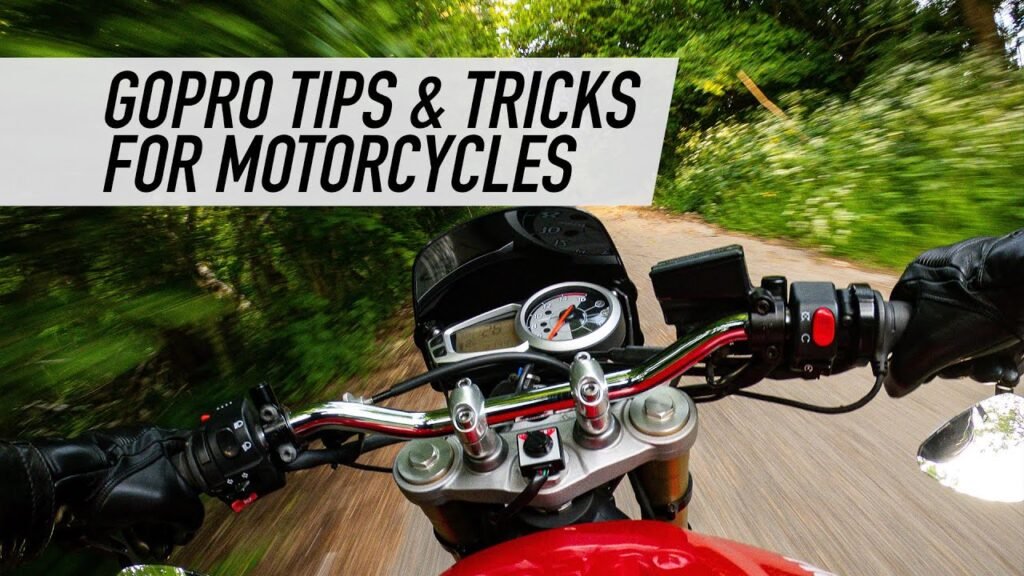
2. Handlebar Mount
The GoPro Handlebar Mount is one mount that many experienced riders would choose if they could only pick one, since you can unclip the camera in a pinch if you want to shoot from a handheld angle and then quickly clip it back in when needed.
The handlebar position gives you a stable, forward-facing shot that includes the road, maybe a bit of your hands and instruments, and the horizon ahead. It’s less dramatic than helmet footage but much more consistent. Good for long touring rides where you just want clean documentation of where you’ve been.
Here’s where it gets interesting though: not all handlebar mounts are created equal. GoPro makes okay cameras, but many of their own tube and bar mounts are cheaply built, break often, and are severely overpriced. They vibrate badly when mounted to a motorcycle. That’s a real rider with years of experience talking, not marketing copy.
The community-favorite alternatives are RAM Mounts (specifically the RAM B-series with the rubber ball and socket system) and the Biker GoPro Gripper. Both are significantly more solid than GoPro’s own bar mount. RAM’s patented rubber ball and socket technology facilitates near-infinite adjustability, and its marine-grade aluminum construction ensures durability in diverse weather conditions.
Best for: Touring, commuting, documenting scenery, incident recording.
Also Read How to Use GoPro for Vlogging on a Budget (Honest Guide for 2025-26)
3. Tank or Fairing Mount
This one’s a bit polarizing. When it works, it creates this low, wide-angle view looking back at the rider with the road streaming behind, which looks genuinely cool. When it doesn’t work, it’s basically unusable.
The problem is proximity to the engine. To avoid vibration issues, mount closer to the center of gravity of the bike if possible, mount on the chassis if possible, and use a medium firmness rubber to dampen the engine vibrations.
On smooth bikes like inline-fours (your typical sport bikes), tank mounts often work reasonably well with a suction cup. On V-twins, particularly older air-cooled ones, good luck. For bikes with high engine vibration, placing a camera on the fuel tank can result in extremely jelly-like footage. The jello effect is real and it’s brutal.
Best for: Casual riders on smooth bikes wanting a cinematic “looking back at rider” shot as a secondary angle.
4. Chest Mount
The Chesty gets slept on. It’s a lightweight, flexible, and comfortable chest mount for hands-free POV footage. It sits lower than a helmet mount and captures a slightly different perspective, one that shows more of your arms and the bike itself in the frame.
To be honest, it’s not the most popular choice for motorcycling specifically because the body armor and jacket you’re wearing can make it uncomfortable or awkward to position. And on a sport bike, your tucked-in riding position means the camera sometimes ends up facing the tank instead of the road.
It works better on cruisers and touring bikes where you’re sitting more upright.
Best for: Upright riding positions, showing bike-rider interaction, casual cruising footage.
The Vibration Problem (This Will Ruin Your Footage If You Ignore It)
Let’s talk about this properly because it’s the number one reason new riders end up with unusable footage.
Every motorcycle vibrates. The question is how much vibration reaches your camera. And the answer depends on the type of engine, where you mount the camera, what mount you use, and what speed you’re traveling.
For bikes with high engine vibration, using a thick layer of rubber between the frame and mount, and staying as far away from the engine as possible, can help significantly reduce the jello effect.
The practical tips that actually work, based on real rider experience:
- Use a RAM mount with the rubber ball socket rather than rigid plastic mounts
- Mount on the handlebars rather than directly on the frame near the engine
- Use vibration dampening pads (some riders cut up old inner tubes and layer them between the mount and the bike surface)
- On high-vibration bikes, the helmet is genuinely your best friend since your body naturally absorbs a lot of the engine shake
- Use a higher frame rate (60fps instead of 30fps) since it gives the stabilization software more to work with
Modern GoPros like the HERO12 and HERO13 have HyperSmooth stabilization that helps a lot, but it can’t fully compensate for intense engine vibration. The stabilization handles shake, but the high-frequency “jello” distortion needs to be addressed at the mounting stage.
GoPro Settings That Actually Matter for Motorcycle Footage
Getting the mount right is half the battle. The settings matter too.
Resolution and Frame Rate: 1080p at 60fps is the sweet spot for most motorcycle riders. It gives you smooth footage, the stabilization works well, and file sizes stay manageable. 4K at 30fps looks stunning on a large screen but you’ll burn through storage fast, and at 30fps you sometimes see more vibration artifacts.
HyperSmooth: Keep it on. Always. The difference is night and day, especially on bumpy roads.
Field of View: Linear mode is underrated for motorcycle footage. The default wide/superview distorts the road and makes everything look slower than it actually is. Linear gives a more accurate, natural perspective that actually shows how fast you’re going.
Battery Life: This is a real concern on longer rides. The Enduro Battery boosts run time by up to 40% in moderate temperatures and can improve cold-weather performance down to 14 degrees Fahrenheit. If you’re doing long touring days, get an Enduro battery and carry a spare.
Wind Noise: This is the dirty secret of GoPro motorcycle footage. The audio is almost always terrible without wind protection. A foam wind cover helps somewhat. Some riders just mute the audio entirely and add music in post. A dedicated Bluetooth audio recorder mounted inside the helmet paired with the GoPro via the Media Mod is the premium solution, but that’s a whole separate rabbit hole.
The Safety Tether: Don’t Skip This
Here’s something the marketing materials don’t lead with but experienced riders always mention: always use a safety tether on your mount.
At 70mph on a highway, if your mount fails and your GoPro comes loose, it becomes a projectile. What to look for in a reliable motorcycle mount includes secure adhesion (cleaning with isopropyl alcohol beforehand), compatibility with your GoPro model, and a safety tether.
GoPro sells tethers. Third-party ones work fine too. Thread it through the wrist loop on the camera housing and attach the other end to your handlebars, jacket, or another secure point. It takes about 30 seconds and could save your camera, or more importantly, prevent an injury to another rider if the camera flies off at speed.
Comparing the Main Mount Options
| Mount Type | Best For | Vibration Risk | Cost Range |
|---|---|---|---|
| Helmet Chin Mount | POV immersive footage | Low to moderate | $20-$80 |
| RAM Handlebar Mount | Stable road footage | Low (with rubber isolators) | $30-$60 |
| GoPro Official Bar Mount | Budget starting point | Moderate to high | $20-$30 |
| Tank Suction Cup | Secondary cinematic angles | High (engine-dependent) | $30-$50 |
| Chest Mount (Chesty) | Cruiser/touring riders | Very low | $30-$40 |
Frequently Asked Questions
Q: What is the best GoPro motorcycle mount for beginners?
The handlebar mount is the safest starting point for most beginners. It’s stable, easy to adjust, and gives clean footage without requiring you to modify your helmet. RAM’s handlebar mount with the rubber ball socket is a better investment than GoPro’s own bar mount if your budget allows. Once you’re comfortable with your setup and know what kind of footage you want, the helmet chin mount is worth exploring next.
Q: Why does my GoPro footage look like jello when mounted on my motorcycle?
This is the rolling shutter effect caused by engine and road vibrations. The CMOS sensor in GoPros reads the image line by line, and when high-frequency vibrations hit the camera, different parts of the frame are captured at slightly different moments, creating that wavy distortion. The fix involves using rubber isolation mounts, mounting as far from the engine as possible, using higher frame rates, and ensuring your mount is tight with no loose play.
Q: Is it legal to mount a GoPro on a motorcycle helmet?
Laws vary by country and region, so check your local regulations. In many places it’s perfectly legal as long as the mount doesn’t add significant protrusion that could increase head injury risk in a crash. Most reputable helmet mount manufacturers design their products to be low-profile for this reason. That said, some regions and racing organizations have specific rules about camera mounts on helmets, so verify before a track day.
Q: How do I protect my GoPro from rain while riding?
Modern GoPros (HERO9 and newer) are waterproof to 33 feet without a case, so light rain isn’t a problem at all. The bigger issue is the lens getting water droplets that ruin footage. A hydrophobic lens coating (like GoPro’s own anti-fog inserts or aftermarket hydrophobic lens protectors) helps water bead off in heavy rain. At highway speeds, rain usually gets blown off the lens fairly quickly anyway.
Q: How long does a GoPro battery last when recording on a motorcycle?
A standard GoPro HERO13 battery lasts roughly 60 to 90 minutes of continuous recording depending on settings and temperature. Cold weather significantly shortens battery life. The Enduro battery extends that to around 90 to 120 minutes. For longer rides, many riders wire a USB-C charging connection to their bike’s battery or accessory power, allowing continuous charging while riding. This keeps the battery topped up on all-day adventures.
Q: Can I use my GoPro as a motorcycle dashcam for insurance purposes?
Absolutely, and this is actually one of the most practical reasons to set up a GoPro on your bike. A GoPro used as a dashcam has been successfully used to support no-fault insurance claims and to report dangerous driving to the police, with footage supplied as evidence. A handlebar mount pointing forward is the most useful setup for this purpose. Enable the Quick Capture setting so the camera starts recording automatically when you power it on, and consider enabling the looping feature so it records continuously and overwrites old footage automatically.
Final Verdict
After going through all of this, here’s the honest take: the GoPro is genuinely one of the best tools a motorcyclist can have, but setup matters enormously. The camera is only as good as where and how it’s mounted.
Start with a quality handlebar mount (RAM over GoPro’s own brand) or a decent helmet chin mount. Add a safety tether, no exceptions. Use 1080p at 60fps with HyperSmooth on. Clean the mounting surface with isopropyl alcohol before sticking anything. And if you’re on a high-vibration engine, use rubber isolation wherever possible.
The jello effect is beatable. The wind noise is manageable. And once you get your setup dialed in, you’ll wonder how you ever rode without it.
Your first few attempts will probably still have some issues. That’s normal. Every experienced moto-videographer has a folder of embarrassing early footage. The point is to keep experimenting with angles and settings until you find what works for your specific bike, your riding style, and the kind of content you actually want to watch later.
And one more thing: don’t spend so much time thinking about the camera that you forget to enjoy the ride. The best footage always comes from the rides you weren’t trying to make into a production.
Focus Keyword: GoPro motorcycle mount guide
