
So you’ve got a GoPro, a rafting trip planned, and a vague idea that you’ll “figure it out on the water.” Been there. And honestly, that approach cost me some genuinely great footage during my first few trips – including one where I hit record a full thirty seconds after the biggest drop of the day. Not ideal.
A solid GoPro river rafting setup isn’t just about strapping a camera to your head and hoping for the best. There are mount choices, settings, accessories, and small decisions that make the difference between cinematic river footage and a shaky, waterlogged blur. After a fair bit of trial and error (and one very uncomfortable moment watching my camera wobble over a Class IV rapid), here’s what actually works.
Who This Guide Is For
If you’re planning a single-day or multi-day whitewater rafting trip and want usable, exciting footage to bring home, this is for you. Doesn’t matter if it’s your first time out or your tenth. Most people with GoPros on rafts are making at least two or three avoidable mistakes that are killing their shots. This covers the full setup from mount selection to camera settings, plus the accessories you actually need versus the ones that just look good on Amazon.
The Mount Question: Where to Put the Camera
This is where most people get tripped up, and honestly, the answer depends on how you’re rafting.
Helmet Mount
This is the most popular option for a reason. It gives you a natural first-person perspective and keeps your hands completely free for paddling, which matters more than you’d think once you’re in fast water. Most rafting companies provide helmets, and a vented helmet strap slots right in. One thing to watch out for: mount the camera toward the front and keep it low on the helmet. A high, forward-perched camera catches wind, wobbles, and occasionally smacks into other people’s paddles.
The one frustrating thing with helmet mounts is that you can’t easily check whether you’re recording. The camera is literally on top of your head. GoPro’s voice command feature (“GoPro, start recording”) helps here, but get in the habit of checking the blinking red light before any major rapid. It sounds basic, but it’s incredibly easy to miss in the excitement of the moment.
Chest Mount
Chest mounts give a different look – you see more of your body and hands in the frame, which some people like and others find distracting. The big downside when rafting is that paddles cross in front of your chest constantly. Depending on where you’re sitting, your paddle arm blocks the lens more often than you’d expect. If you’re in the back of the raft steering, this becomes less of an issue.
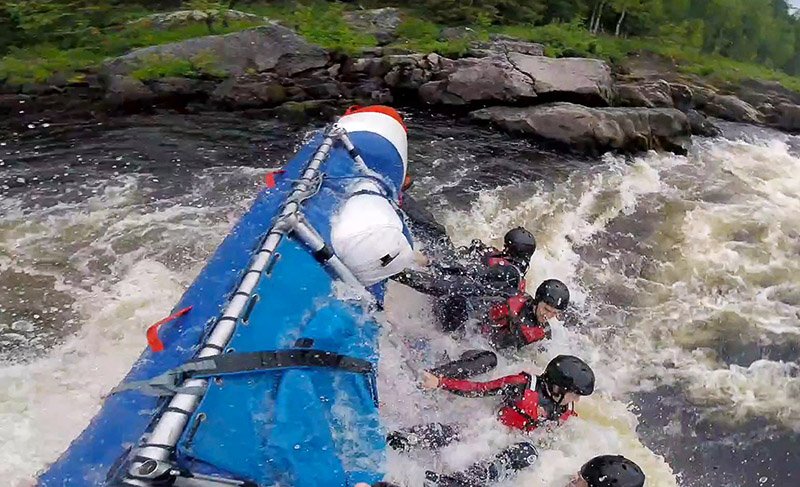
Raft Mount
Some commercial outfitters use proprietary hardware to mount cameras directly to the front of the raft. If you’re on a guided trip, ask about this option. The perspective is dramatic and stable – you get the whole crew reacting as the raft crashes through a drop. At home, DIY setups using suction cup mounts can work, but always add a safety tether. Suction cups on wet fiberglass in turbulent water are not something to trust unconditionally.
What About a Selfie Stick?
Leave it. Seriously. With both hands on a paddle through Class III or IV water, a selfie stick is just a liability. It’s also how cameras end up at the bottom of rivers.
The Settings That Actually Matter
Here’s where it gets interesting, because a lot of people just leave their GoPro on whatever auto setting it came with. That’s fine, but you’ll get better results with a few intentional tweaks.
Also Read GoPro Motorcycle Mount Guide: Everything You Actually Need to Know Before You Ride
Resolution and Frame Rate
Set your camera to 4K for the main video. The footage is sharp, holds up on big screens, and gives you room to crop in post if you want. For frame rate, 60fps at 4K is the sweet spot for river rafting. Why? Because at 60fps you can slow the footage down to half speed and it still looks smooth. Rapids at half speed are genuinely stunning, and it lets you show details that happen too fast in real-time to really appreciate.
HyperSmooth Stabilization
Turn this on. Always. The Hero7 was the first GoPro to really nail stabilization, and the newer models (Hero11, 12, and 13 especially) do it even better. Without it, rapid footage looks like someone filmed it during an earthquake. With it, the same clip feels intentional and watchable.
Wide Angle vs. Linear Field of View
GoPros default to wide angle, which creates that classic fisheye look. For dramatic river shots where you want to capture the full scene – raft, water, canyon walls – wide is great. But if you’re shooting from the front of a paddle raft, the fisheye can distort the curves of the raft in a way that looks strange. Try linear mode for flatter, more natural footage when you’re closer to subjects.
Photo Mode for Still Shots
For photos, burst mode is surprisingly useful on the water. Set it to take multiple frames in quick succession, then pick the best one. The timing of a perfect wave crash is nearly impossible to nail with a single shutter press. Burst mode removes that problem entirely.
QuikCapture
Enable this in your settings menu. It lets you power on the camera and start recording with a single press of the shutter button. No menus, no delays. When a guide suddenly says “big one coming up,” you don’t have time to navigate three screens.
The Accessories That Are Worth Bringing
You don’t need everything in the GoPro accessories catalog. But a few things are non-negotiable on the river.
Extra Batteries One battery typically gives you three to four hours of mixed shooting. For a half-day trip, that’s usually fine. For a full day or multi-day trip, bring at least one spare, ideally two. There’s nowhere to charge on the river. A dual battery charger speeds things up at camp.
High-Speed MicroSD Card Newer GoPro models are picky about cards. If you put in a slow or incompatible card, the camera can freeze mid-record. Use a SanDisk Extreme or equivalent card, 128GB minimum. Format it in the camera (not your laptop) before the trip. And bring a spare card.
A Tether This one is genuinely important. GoPro mounts are plastic, and plastic fails. A simple tether looped through your helmet or mount means that even if the camera pops loose, it doesn’t end up at the bottom of the river. The peace of mind alone is worth the few dollars it costs.
Floaty Backdoor or Floaty Grip GoPros sink. Despite being waterproof, they have no natural buoyancy. A floaty accessory keeps the camera bobbing on the surface if it hits the water. One river guide mentioned watching a camera get saved by this exact accessory after an unexpected flip in Idaho. It’s one of those things you don’t think about until you need it.
Anti-Fog Inserts If you’re using a protective case, throw a couple of these in. Temperature swings between cold river water and warm air cause fogging inside the housing, and there’s nothing more frustrating than reviewing footage at camp and finding every clip has a hazy smear across the lens. Anti-fog inserts solve this for about two dollars.
Pelican Case or Ammo Can for Storage The camera itself is waterproof, but your spare batteries and SD cards aren’t. Keep them in a hard-sided waterproof case during transit. Some river veterans actually prefer metal ammo cans over Pelican cases for particularly gnarly rocky sections – they resist crushing better.
Angle and Positioning Tips
Where you sit in the raft genuinely changes what your footage looks like.
In the front row, you get the bow crashing through waves with water coming directly at the lens. Dramatic and exciting, though your lens will get splashed constantly. In the back, you sit a bit higher and can see your whole crew reacting to what’s ahead – great for capturing the human element.
Position the camera above shoulder height whenever possible. Lower angles tend to get lens-blocking water splashes more frequently. And whenever you’re about to hit a big section of water, do a quick lens check. One tiny droplet on the front of the lens can ruin an otherwise perfect clip. Blow it off or wipe it quickly with a finger if needed.
One slightly quirky setup worth trying: mount the camera on the helmet facing backward, so it captures your crew’s reactions while you paddle forward into the action. People look genuinely surprised and thrilled going through rapids, and that footage is often more engaging than just looking at water.
Battery Life and Filming Strategy
Here’s something a lot of guides actually suggest: don’t record everything. It drains battery and fills cards with footage of flat, calm water you’ll never watch. Let your guide or someone experienced on the trip signal when the significant rapids are coming, then hit record. The exciting sections, the drops, the moments where everyone is screaming – those are what you want.
Between rapids, turn the camera off or switch to standby. Voice commands help here. “GoPro, stop recording” and “GoPro, start recording” are real features and they work well enough in moderately noisy conditions.
GoPro Hero Models Worth Considering
The Hero11, 12, and 13 are all genuinely excellent for water sports right now. HyperSmooth on the Hero11 and up is markedly better than earlier models, and the wider lens captures more of the scene without the extreme fish-eye distortion of older cameras. The Hero13 added magnetic lens mods, which let you switch between wide, ultra-wide, and macro perspectives without tools.
To be honest, if you already have a Hero9 or Hero10, you don’t necessarily need to upgrade for rafting purposes. The stabilization on those models is already good, and 4K at 60fps has been available since the Hero9. Where the newer models shine is in low light performance and better color science – both less critical in bright daylight river conditions.
Common Complaints from Real Users
- The chest mount gets blocked by paddle arms constantly – this is a genuine issue people don’t warn you about enough
- Fisheye distortion on the raft itself looks odd in many shots; most people don’t know to switch to linear mode
- Forgetting to check recording status before a major rapid and missing the shot entirely
- Lens fogging inside housing during temperature changes
- Mounts failing mid-trip and losing the camera to the river – always use a tether
- Battery dying faster than expected when WiFi is left on (turn it off when you don’t need it)
FAQs
1. Is a GoPro waterproof enough for river rafting without any additional housing?
Yes, modern GoPros (Hero5 and newer) are waterproof up to 33 feet without any housing. For standard rafting conditions, you don’t need a separate underwater housing. That said, if you’re planning to dive or fully submerge the camera repeatedly, adding a dive housing gives extra peace of mind and protects the camera from impact damage too.
2. What is the best GoPro mount for river rafting?
For most paddlers, a helmet mount is the best option – it keeps hands free, gives a natural POV, and offers a stable, predictable angle. If you’re on a motorized or oar raft where your hands aren’t on a paddle, a chest mount or a raft-mounted camera gives different and sometimes more cinematic angles. The key is always adding a safety tether regardless of which mount you use.
3. What GoPro settings should I use for whitewater rafting?
Set video to 4K at 60fps with HyperSmooth stabilization turned on. Use wide or linear field of view depending on your shooting angle. Enable QuikCapture so you can start recording with one button press. Turn off WiFi and Bluetooth when not needed to preserve battery life. For photos, burst mode works better than single shot in fast-moving water.
4. How many batteries do I need for a full-day rafting trip?
For a single day trip (four to eight hours on the water), two batteries is typically enough if you film selectively. If you record continuously throughout the day, bring three. Multi-day trips with no charging access need even more – plan on one battery per three to four hours of actual shooting time, and store spares in a waterproof case.
5. What happens if my GoPro falls in the river?
Without a floaty accessory, it sinks. GoPros are waterproof but not buoyant. The best prevention is a tether attached to your mount or helmet and a floaty backdoor or grip on the camera. If it does go in and you recover it, remove the battery, dry everything with a microfiber cloth, and let it air out before using it again. Do not use rice – it’s not effective.
6. Can I use my GoPro on a guided commercial rafting trip?
Yes, almost all commercial rafting companies allow guests to wear helmet or chest mounts. Some even provide helmets with built-in GoPro mounts. However, most won’t let guests stick adhesive mounts directly to rental helmets, so bring a vented helmet strap instead. Always ask your guide before the trip – they can also tell you which sections are worth filming and when to save battery.
Final Verdict
A proper GoPro river rafting setup genuinely changes what you bring home from a trip. The difference between decent footage and great footage often comes down to three things: using the right mount with a tether, getting your settings right before you launch, and having enough battery and storage so you’re not scrambling when the big rapid shows up.
The GoPro is, honestly, just about perfect for this kind of adventure. It’s tough, waterproof, small enough to not interfere with paddling, and the stabilization on current models is really impressive in rough conditions. It’s not a camera that demands much technical knowledge, either. A few setting adjustments and the right accessories, and you’re set.
Just please, check that the red light is blinking before you drop in. Nothing hurts quite like looking at your camera after the best rapid of the day and realizing you were on standby the whole time.
