
There’s nothing more frustrating than being mid-adventure, hitting record on your GoPro, and then realizing your footage is choppy, corrupted, or worse, the camera just refuses to write to the card at all. Ask anyone who’s come back from a surf trip or a mountain bike run with nothing but error messages and they’ll tell you: the SD card matters way more than most people think.
This guide is for anyone tired of guessing. Whether you’ve got a brand new Hero 13 or you’re still rocking a Hero 9, picking the right card makes a genuine difference. Not just for storage, but for how well your camera actually performs under pressure.
Who This Is For
If you’re shooting 4K on your GoPro regularly, especially at higher frame rates like 60fps or above, you need a card that can keep up with the write speeds. Casual shooters doing 1080p clips on weekends have a bit more wiggle room, but even then, a slow or unreliable card can cause dropped frames and file corruption at the worst moments. This guide covers options across different budgets and use cases.
What Actually Matters in a GoPro Memory Card
Before jumping to recommendations, here’s what you actually need to pay attention to.
Speed Class. The newer GoPro models (Hero 9 and above) push bitrates of around 100 Mbps, and the Hero 13 goes even higher at 150 Mbps. For this you need at minimum a U3/V30 rated card. U1 cards just won’t cut it for 4K. Think of U3 as the minimum entry ticket to stable 4K recording.
UHS-I vs UHS-II. Here’s something worth knowing: GoPro cameras don’t actually have UHS-II hardware support. So even if you buy a fancy UHS-II card, it’ll run at UHS-I speeds in your GoPro. You won’t be gaining anything in terms of write performance inside the camera itself.
Capacity. A 64GB card holds roughly 2 hours of 4K footage at 60fps. For day trips, that’s usually fine. For longer expeditions or shooting in burst mode constantly, 128GB or 256GB is the safer bet.
Durability. Since GoPros go everywhere, the card inside them should too. Waterproof, shockproof, temperature-resistant ratings aren’t just marketing. They genuinely matter when your camera takes a tumble or gets soaked.
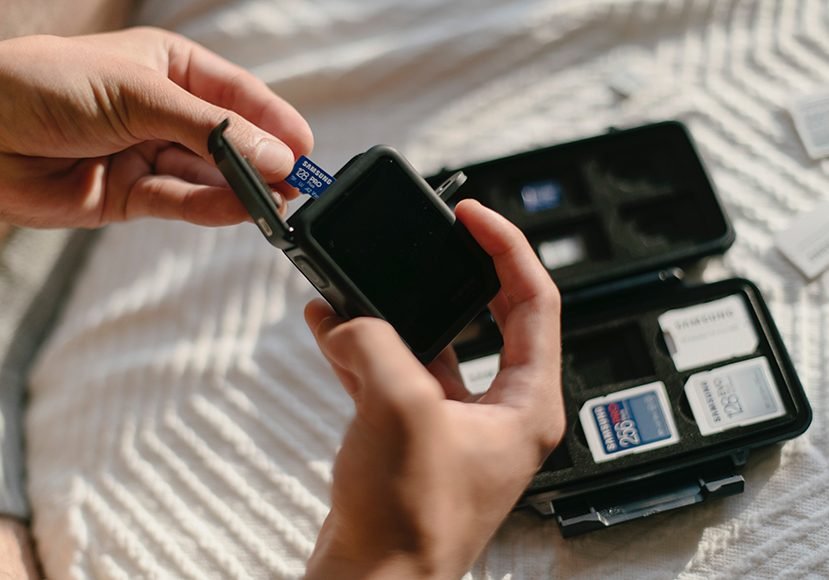
Top Picks: Best SD Card for GoPro
1. SanDisk Extreme (Best All-Around Pick)
If you ask most GoPro users what card they use, there’s a solid chance SanDisk Extreme comes up. GoPro officially recommends it, and it’s been battle-tested across pretty much every camera model they’ve released.
Read speeds top out around 160 MB/s and write speeds hit about 90 MB/s depending on the size you buy. The V30 and U3 ratings mean it’s well-suited for 4K 60fps without dropped frames. It also comes with a full-size SD adapter, which is handy when you’re offloading footage to a laptop.
After using it for a while, one thing stands out: it’s just consistent. It doesn’t run hot, doesn’t randomly unmount, and handles being thrown in a wet bag repeatedly without complaining. Available in sizes from 64GB all the way to 1TB, so you can pick what fits your shooting style.
One thing I noticed is that some users on forums mention they had to reformat the card using the camera’s own format menu before it worked properly. This is pretty standard practice and worth doing before any first use anyway.
Best for: All GoPro models, especially Hero 10, 11, 12, 13. A reliable everyday choice.
Also Read GoPro vs Insta360 X4 for Beginners: Which One Should You Actually Buy?
2. Samsung PRO Plus microSD (Best for Speed-Hungry Shooters)
The Samsung PRO Plus is a step up in raw speed compared to the standard Extreme. Read speeds go up to 160 MB/s and write speeds hit around 120 MB/s, which gives you a little extra headroom if you’re shooting in the highest bitrate modes.
It’s rated V30, U3, and A2, and it holds up well in harsh conditions. Temperature proof, waterproof, X-ray proof. Samsung cards have a good reputation for longevity, and the PRO Plus lives up to that.
To be honest, for most people shooting standard 4K on a Hero 11 or 12, you won’t feel a massive difference between this and the SanDisk Extreme in day-to-day use. Where it does pull ahead is when you’re doing back-to-back heavy shooting sessions and need consistent write performance without any slowdowns as the session goes on.
If you’re more of a GoPro power user, or you’re also using the same card across a drone and your GoPro, this is a great option.
Best for: Hero 11, 12, 13 users who shoot in high bitrate modes consistently.
3. Samsung EVO Select (Best Budget-Friendly Option)
Not everyone needs to spend top dollar on a memory card. The Samsung EVO Select is a genuinely solid option if you’re a casual GoPro user shooting mostly 1080p or occasional 4K clips.
It offers read speeds up to 100 MB/s and write speeds of 60 MB/s or higher depending on the model. It’s U3 rated, so it handles 4K well in standard shooting modes. The card is also waterproof and comes with an adapter.
Here’s where it gets interesting though. Some users on Reddit and GoPro forums report that the EVO Select can occasionally struggle with very long 4K recording sessions or back-to-back continuous shooting. For shorter bursts, it’s absolutely fine. If you’re doing multi-hour 4K sessions, step up to the Extreme or PRO Plus.
The price makes it appealing for someone who needs a backup card or is just getting started with GoPro.
Best for: Casual shooters, GoPro beginners, or as a backup card.
4. Lexar Professional 1066x (Great Alternative to SanDisk)
Lexar has been making a comeback and the 1066x is one of the better picks in the mid-to-high range. It uses UHS-II technology which, as mentioned earlier, won’t give you full UHS-II speeds in a GoPro, but the UHS-I performance is still strong enough.
The V30 rating is there, read speeds go up to 160 MB/s, and the card handles 4K footage without breaking a sweat. It’s also built for rough conditions with waterproof and shockproof protection.
One thing worth mentioning: Lexar isn’t on GoPro’s official recommended list the way SanDisk or Samsung is, but real-world performance in forums and user reports suggests it works reliably across most models. If SanDisk is out of stock or this is priced better at the time of your purchase, it’s a very legitimate choice.
Best for: GoPro Hero 9 and above, users wanting a reliable alternative to SanDisk.
5. Delkin Devices Power microSD (For the Serious Shooter)
Delkin doesn’t get talked about as much as SanDisk or Samsung but they’re actually one of GoPro’s officially recommended brands. The Power series is built specifically with action cameras in mind and it shows.
Write speeds of up to 100 MB/s and read speeds of 250 MB/s (though again, the camera limits what you can actually use). The card is V60 rated in some variants, which is above what most GoPro shooters even need, but it means the card has plenty of overhead.
It’s pricier than the other options on this list. But if you’re doing professional work with your GoPro and reliability is non-negotiable, the Delkin Power is the kind of card you buy once and don’t worry about again.
Best for: Professional GoPro users, long expeditions, anyone who can’t afford to lose footage.
Honest Pros and Cons
What GoPro users actually like about fast SD cards: Most people who’ve switched from a generic or slower card to something like the SanDisk Extreme or Samsung PRO Plus notice the camera is snappier in general. Menus respond faster, the camera is ready to shoot again quicker after a burst, and offloading footage to a computer takes noticeably less time.
What people actually complain about: The most common issue across forums and Amazon reviews is cards not being recognized by the camera straight out of the box. The fix is almost always the same: format the card using the GoPro’s internal format option, not your computer. A lot of frustration comes from people skipping this step.
Another complaint is around fake or counterfeit cards. If you’re buying from unofficial marketplaces or unusually cheap listings, the risk of getting a counterfeit card is real. Stick to official retailers or reputable Amazon sellers for this stuff.
Some users with older GoPro models also report compatibility issues with higher capacity cards (256GB and above). If you’re on a Hero 7 or older, 64GB or 128GB tends to be the safer play.
Quick Comparison
| Card | Speed Class | Read Speed | Best For |
|---|---|---|---|
| SanDisk Extreme | U3, V30 | Up to 160 MB/s | All-around, every GoPro model |
| Samsung PRO Plus | U3, V30 | Up to 160 MB/s | High bitrate, power users |
| Samsung EVO Select | U3, V30 | Up to 100 MB/s | Budget, casual use |
| Lexar 1066x | U3, V30 | Up to 160 MB/s | Solid SanDisk alternative |
| Delkin Power | U3, V60 | Up to 250 MB/s | Professional, long sessions |
FAQs
Q1: What is the best SD card for GoPro Hero 12 and Hero 13?
For the Hero 12 and 13, you want at minimum a U3/V30 card. The SanDisk Extreme and Samsung PRO Plus are both excellent fits. The Hero 13 pushes a higher bitrate of 150 Mbps, so the Samsung PRO Plus with its faster write speeds gives you a bit of extra buffer for those demanding recording modes. Either way, anything V30 or above will handle 4K 60fps just fine.
Q2: Can I use a 1TB SD card in my GoPro?
Most newer GoPro models (Hero 11 and above) support up to 1TB. The Hero 11 was actually the first model reported to support it. Older models top out at 256GB or 512GB. Always check your specific model’s supported capacity before buying a large card.
Q3: Why does my GoPro not recognize my new SD card?
This happens fairly often and the fix is straightforward. Go into your GoPro’s settings and format the card directly from the camera. Formatting via a computer or phone uses a different file system that the camera sometimes doesn’t play well with. Doing it through the GoPro ensures the card is set up exactly how the camera expects.
Q4: Is a UHS-II card worth it for GoPro?
Not really. GoPro cameras only support UHS-I hardware, meaning a UHS-II card will run at UHS-I speeds inside your camera. You’d be paying a premium for speed you can’t use. Save that money for a higher capacity card instead.
Q5: How much storage do I need for a GoPro?
A 64GB card holds roughly 2 hours of 4K 60fps footage. For a day trip or weekend adventure, 128GB is a comfortable amount. If you’re going on a multi-day trip or do a lot of burst shooting, 256GB gives you room to breathe without constantly offloading footage. Most casual shooters are completely fine with 128GB.
Q6: Does a faster SD card improve GoPro performance?
Yes, in meaningful ways. A faster card reduces the time the camera spends writing data, which means it’s ready to record again sooner after heavy shots. It also reduces the risk of dropped frames during sustained 4K recording. Transfer times to your laptop also get noticeably quicker. The performance gains are most noticeable if you’re upgrading from a slow or generic card.
Final Verdict
For the majority of GoPro users, the SanDisk Extreme is still the card to get. It’s officially recommended by GoPro, it’s been proven across every camera generation they’ve made, and it hits the right balance of speed, reliability, and price. Pick 128GB or 256GB depending on how long you shoot.
If you’re on the newer Hero 12 or 13 and using the high bitrate modes seriously, the Samsung PRO Plus is worth the small premium for the extra write speed headroom.
Avoid going cheap here. A great GoPro experience getting ruined by a budget card that causes dropped frames or corrupted files is genuinely painful, especially when you’ve just captured something you can’t get back.
Buy once, buy right, and go shoot something.
